Modern electronic devices increasingly depend on intuitive visual interfaces that allow users to view information and control functions quickly. Two technologies that play a major role in this experience are the Capacitive Touch Screen and lcd display screen. From industrial control panels and medical equipment to retail terminals, smart appliances, automotive dashboards, and consumer electronics, these technologies help create responsive and user-friendly digital systems.
Although a Capacitive Touch Screen and lcd display screen are often integrated into the same device, they perform different functions. The LCD produces the visual content, while the capacitive touch layer detects finger input. Understanding how both technologies work can help manufacturers, engineers, product designers, and buyers choose the right display solution for their applications.
What Is a Capacitive Touch Screen?
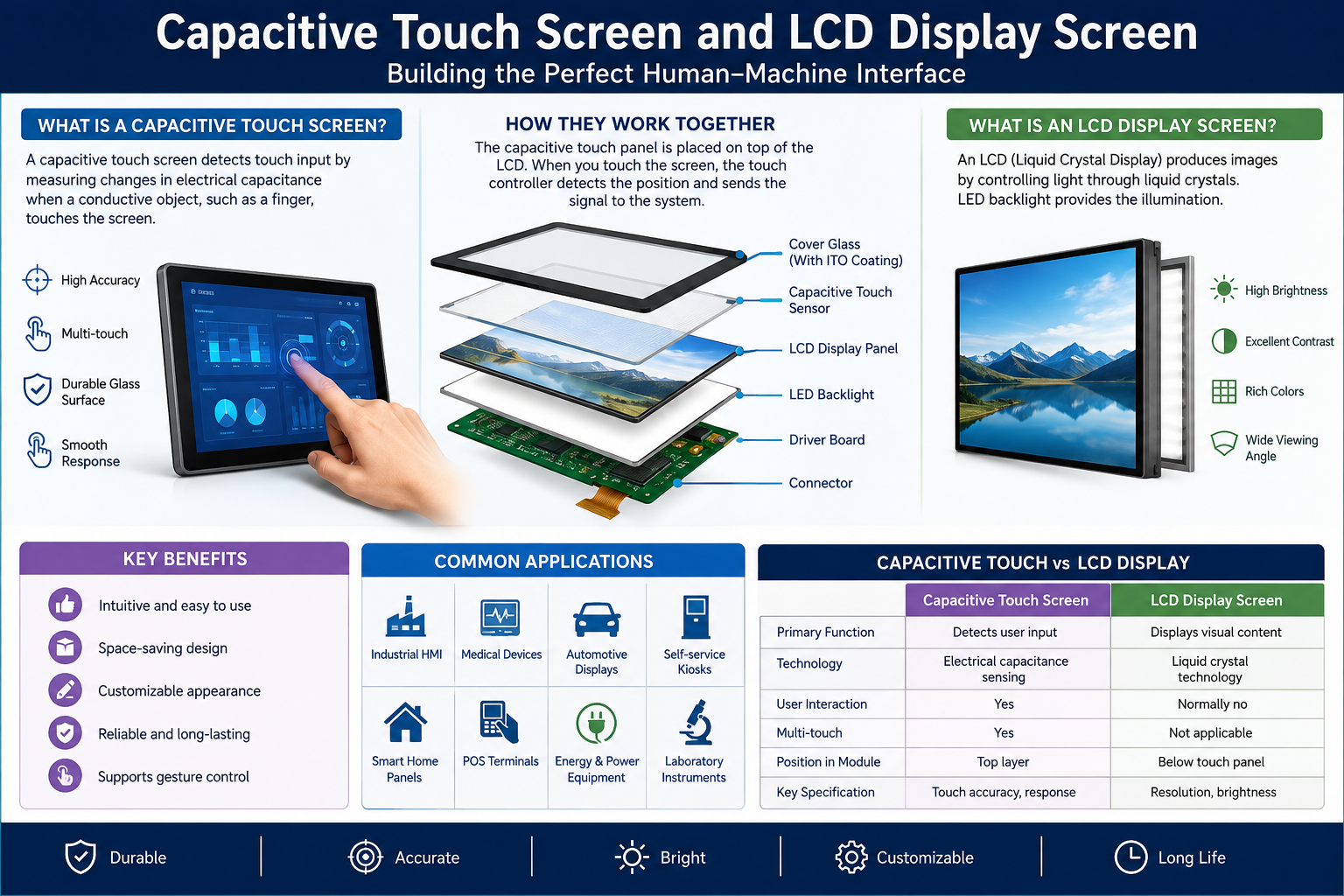
A Capacitive Touch Screen is an input technology that detects changes in an electrical field when a conductive object, usually a human finger, touches the surface.
The screen normally contains a transparent conductive layer positioned above or integrated with the display. When a finger touches the surface, it changes the local capacitance. The touch controller processes this change and determines the exact location of the user’s touch.
Capacitive technology is widely preferred because it offers:
- Fast touch response
- High touch accuracy
- Smooth gesture control
- Multi-touch capability
- Excellent optical clarity
- Durable glass surfaces
- Modern user experience
Smartphones and tablets made Capacitive Touch Screen technology widely recognised, but its applications now extend far beyond consumer electronics.
Understanding an LCD Display Screen
An lcd display screen, or Liquid Crystal Display, is a flat-panel display technology that uses liquid crystals to control how light passes through individual pixels.
Unlike technologies that generate light directly, most LCD panels depend on a backlight. The liquid crystal layer controls the amount of light reaching each pixel, allowing the display to produce text, graphics, photographs, videos, menus, and operational information.
An lcd display screen may be designed in different sizes, resolutions, brightness levels, interfaces, and operating temperature ranges.
Common LCD technologies include:
- TN LCD
- IPS LCD
- TFT LCD
- Monochrome LCD
- Graphic LCD
- Character LCD
Among these, TFT and IPS displays are commonly used when applications require colour graphics, improved viewing angles, and higher image quality.
How Capacitive Touch Screen and LCD Display Screen Work Together
A Capacitive Touch Screen usually acts as the interactive layer placed over an lcd display screen.
The LCD presents visual information such as icons, buttons, menus, readings, and images. When the user touches a displayed control, the capacitive sensor identifies the touch coordinates and sends this information to the device controller.
The process generally follows these steps:
- The lcd display screen shows the graphical user interface.
- The user touches a button or control.
- The capacitive layer detects the change in capacitance.
- The touch controller calculates the touch position.
- The processor interprets the command.
- The interface responds accordingly.
This combination creates the interactive interfaces commonly found in modern electronic equipment.
Capacitive Touch Screen vs LCD Display Screen
| Feature | Capacitive Touch Screen | LCD Display Screen |
| Main Function | Detects touch input | Displays visual information |
| Technology | Electrical capacitance sensing | Liquid crystal display technology |
| User Interaction | Supports direct touch | Primarily visual output |
| Multi-Touch | Usually supported | Not applicable |
| Surface | Typically glass | LCD panel structure |
| Main Application | User input | Images, text and graphics |
| Integration | Installed over or bonded with display | Used as the main visual panel |
The technologies are therefore complementary rather than direct alternatives.
Major Advantages of Capacitive Touch Technology
A major reason for the popularity of the Capacitive Touch Screen is its responsive interface.
Because only light finger contact is required, users can operate controls quickly without applying significant pressure. Modern projected capacitive touch technology can also support gestures such as swiping, zooming, scrolling, and multi-finger operation.
Another advantage is durability. Capacitive panels generally use glass surfaces that can resist repeated interaction better than softer touch technologies.
Additional benefits may include:
- Attractive edge-to-edge design
- Excellent light transmission
- Precise touch positioning
- Custom cover glass
- Anti-glare treatment options
- Water-resistant integration possibilities
- Custom printed borders and logos
These characteristics make capacitive solutions especially useful for premium electronic products.
Benefits of Using an LCD Display Screen
An lcd display screen provides a practical balance between performance, energy consumption, availability, and cost.
Modern LCD technology can deliver high resolutions, accurate colours, strong contrast, and wide viewing angles. Manufacturers can also choose from an extensive range of panel sizes and communication interfaces.
Important advantages include:
- Thin and lightweight construction
- Low power requirements
- Wide range of screen sizes
- Multiple resolution options
- Good colour reproduction
- High brightness options
- Mature and reliable technology
Industrial lcd display screen modules can additionally be manufactured for demanding environmental conditions.
Important Factors When Selecting a Display Solution
Choosing a Capacitive Touch Screen and lcd display screen should involve more than selecting the required dimensions.
Consider the following factors before making a decision:
- Screen size
- Display resolution
- Touch accuracy
- Viewing angle
- Brightness
- Contrast ratio
- Interface compatibility
- Operating temperature
- Cover glass thickness
- Environmental exposure
- Product lifecycle
- Backlight lifetime
Outdoor devices may require high-brightness LCDs and optical bonding, while industrial equipment may need extended operating temperatures and stronger cover glass.
What Is Optical Bonding?
Optical bonding is an integration method where transparent adhesive is placed between the Capacitive Touch Screen and lcd display screen.
Traditional display assemblies may contain an air gap between these components. Optical bonding removes this gap, helping reduce internal reflections.
Potential benefits include:
- Better sunlight readability
- Improved contrast
- Reduced internal reflection
- Increased mechanical strength
- Less chance of condensation
- Improved touch and display integration
Optical bonding is particularly valuable in outdoor terminals, automotive displays, marine equipment, and industrial interfaces.
Applications Across Different Industries
The combination of Capacitive Touch Screen technology and an lcd display screen can be found across numerous sectors.
Common applications include:
- Industrial automation systems
- Medical devices
- POS terminals
- Smart home systems
- Automotive infotainment units
- Navigation systems
- Self-service kiosks
- Measurement instruments
- Fitness equipment
- Security systems
- Laboratory machines
- Consumer electronics
Each application may require a customised balance of brightness, resolution, touch performance, durability, and interface compatibility.
Custom Capacitive Touch Screen and LCD Solutions
Standard modules work well for many products, but specialised equipment often requires customisation.
A customised Capacitive Touch Screen may include special dimensions, printed cover glass, logo printing, custom connector positions, special glass thickness, or tailored touch firmware.
Similarly, a custom lcd display screen solution may involve:
- Special screen sizes
- Custom backlights
- Different interface types
- Enhanced brightness
- Special operating temperature ranges
- Modified connectors
- Custom mechanical structures
Early collaboration between display engineers and product designers can simplify integration and reduce redesign requirements.
How to Improve Display Reliability
Long-term reliability depends on proper component selection and system design.
Manufacturers should evaluate environmental conditions before choosing a screen. Temperature, humidity, sunlight, vibration, dust, moisture, and continuous operating hours can all influence performance.
It is also important to select a qualified Capacitive Touch Screen and lcd display screen supplier that provides technical specifications, integration support, consistent quality control, and suitable lifecycle availability.
Testing prototype units under real operating conditions is strongly recommended before full-scale production.
Frequently Asked Questions
1. What is the main purpose of a Capacitive Touch Screen?
It detects finger input and allows users to interact directly with electronic interfaces.
2. Is an lcd display screen automatically touch-sensitive?
No. An LCD only displays visual content unless a separate or integrated touch sensor is added.
3. Can a Capacitive Touch Screen support multiple fingers?
Yes. Projected capacitive technologies commonly support multi-touch gestures.
4. What is the difference between LCD and touch glass?
LCD produces images, while touch glass detects user interaction.
5. Can capacitive touch technology work with gloves?
Some controllers can be configured for glove operation, depending on glove thickness and system design.
6. Are LCD screens suitable for outdoor use?
Yes, provided suitable brightness, protection, temperature performance, and optical treatments are selected.
7. What is a TFT LCD?
A TFT LCD uses thin-film transistor technology to control individual pixels for improved image performance.
8. Why is optical bonding used?
It reduces reflection, improves visibility, and can increase the mechanical strength of the display assembly.
9. Can the cover glass be customised?
Yes. Size, thickness, printing, shape, coatings, logos, and border colours can often be customised.
10. Which industries use Capacitive Touch Screen systems?
Industrial automation, healthcare, automotive, retail, consumer electronics, security, and smart equipment commonly use them.